Chasing Davies: Photography
Showing posts with label Photography. Show all posts

December 13, 2018

2018 Family Photos!


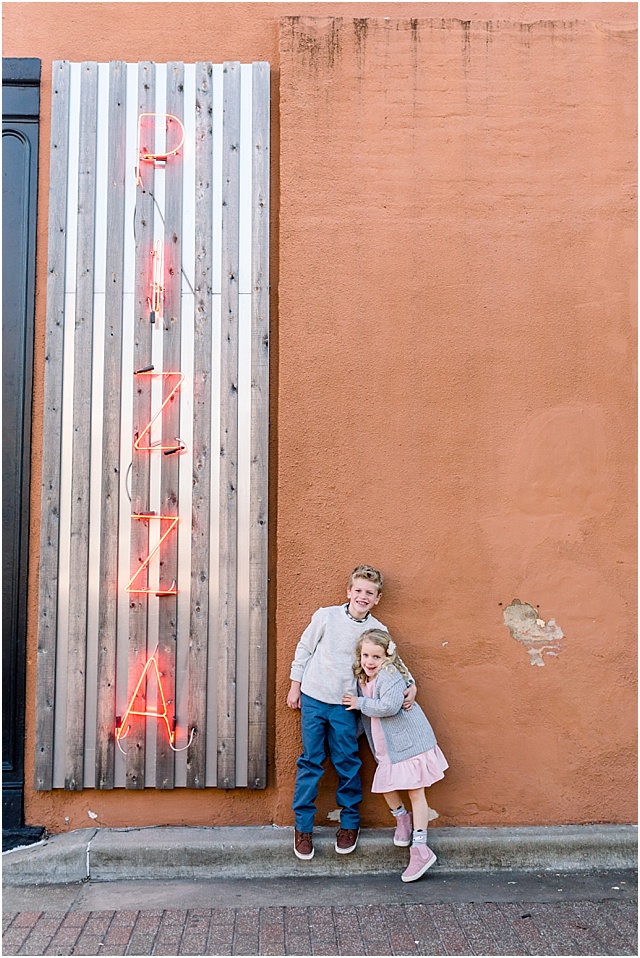
We do family photos about every year and a half, so that I can capture my family in different seasons with enough time in between to see a real difference in their growth.  You can see our family photos taken in 2017 (Spring) and 2015 (Fall), and how quickly these babies of mine are growing!  

This year we bounced around the River Market, and I was very happy with how well my kids cooperated. You never really know - especially after a long day of work/school, and in that witching hour for that magic light.  My trick is little candies that can eat as we walk in-between locations (nothing that takes too long to eat, like suckers - that was a past mistake).  My favorite candy to bring is mini-Twizzlers.

This has been a big year of major growth for my kiddos. They both sprouted up in height, they've lost teeth, each learning a ton for their respective ages, and have mastered getting their own cereal (yessss!!!). But.... would love time to slow down a bit! These little people of mine just might be teenagers the next time I turn around.

Our family outfit pieces:


Follow along here: BlogLovin, Instagram, Twitter, Facebook

April 15, 2018

Wall Crawl of Kansas City!


Whether you're a blogger, aiming to get that perfect Instagramable photo or just looking for a fun background for your own family photos - wall murals have been all the rage across the US for a few+ years now!  And while it's fun to travel to new cities and find their fun murals and brightly painted walls for pictures, Kansas City has some great walls right here!  

This could easily turn into a series featuring a lot more walls (because there are many not included, yet!), but I wanted to at least start with a few of my favorite walls and brightly colored spaces for getting those fun backdrops for your photos (especially now that the weather is getting nice!).  Also, below is a handy map with all the walls plotted out so you can easily do this crawl yourself - and please let me know in the comments below your favorite walls around the KC area.

Some of the pictures in collaboration with my favorite Kansas City photographer, Elizabeth Ladean! See her Instagram here, too.

1. The Star Wall
The Star Wall in Martini Corner might be one of my favorites! It's so whimsical and sweet. You can see more of this wall from my original post here.

2. The Art Alley
The Art Alley in the Crossroads is full of different, brightly colored walls all down an alley, with little off-shoots of more color. What a great backdrop if looking for lots of colors! More photos of this space here and here.

3.  Kansas City Wall
Looking to declare you location and/or love for KC? Here is the wall for you - located in the Crossroads.

4. Diamond Wall
This is an unexpected wall, located on the side of a U-Hawl building - but I love all the diamond shapes the different toned yellows make. It's located just south of PnL, on the south side of the highway.  See more photos here.

5.  Flag Wall
Looking for something patriotic?  That perfect photo for the 4th of July?  This big flag mural is located in downtown Parkville just off of Main St.  See more photos here.

6.  #KCLoves Wall
This wall is most beautifully viewed from afar actually, but if you're looking to get up close and personal, you'll have to go to the top the Barkley of a parking garage!

7.  Flamingo Wall
Looking for something fun for summer? This Flamingo wall on the side of Miami Vice located in the Roanoke area (39th St), has the perfect summer feel.  See more pics for other fun backgrounds at this same location here.

8. Mint Wall
For something subtle and sweet, this mint wall is a lovely backdrop. Located off of Southwest Boulevard, across the street from Boulevard Brewery. See more pics of this wall here.

Here are all these walls plotted to make your own wall crawl easy!


Tell me your favorite walls/murals/photo spots around KC, and you might just be featured on the next Wall Crawl post!

Follow along here: BlogLovin, Instagram, Twitter, Facebook

January 7, 2016

Family Photos in Kansas City!

kansas city family lifestyle photos
In November, we had our family photos taken by the talented Cassandra of Cassandra Castaneda Photography in the Westside area of Kansas City.  I love her lifestyle and family work, so I was really excited to have her help bring my vision of more natural family photos with the city we love as our backdrop to life.  

And boy did she have her work cut out for her!  It ended up being a bit colder than anticipated and Nora was NOT into any of it (ah, toddlers - they can be so hit or miss) - she never once let us put her down.  And the tights I had bought and brought for her to wear were mis-marked and giant - so she was bare-legged and probably a bit cold...

But one thing that did work for us - just in case it might help you... 

Both kids had been extremely picky on their clothing over the few weeks prior to these photos. I was super worried they were going to throw fits about their outfits and tear them off.  So, I picked out their clothes the weekend before these photos, giving us a few days to talk about the outfits, look at them hanging on the closet handles and talk about how we were getting our pictures taken and only have to wear these clothes for an hour or so.  It worked pretty well for Liam, who at the time only wanted to be wearing sweatpants (men...).

Here are some of our favorites!


Our Outfits:
Me: Top - old from Loft; Pleated Skirt - old from ASOS, but similar here & here; Wedge Booties c/o
Liam: Pants and Button Down Shirt (worn open) c/o FabKids; Under T-Shirt - J.Crew; Sneakers
Nora: Dress & Cardigan; Moccs

Follow along here: BlogLovin, Instagram, Twitter, Facebook

April 23, 2015

4 Tips to Posting Better Photos on Instagram

Instagram is my favorite social channel these days... (followed maybe by... SnapChat! There, I said it! I admit it!  I love them for very different reasons, but that's for another day... oh, you can follow me there, too, at ChasingDavies).  I love Instagram because I taking pictures is my hobby and I love working on sharing a feeling through an image or capturing my children in a cool or different way. I also love looking at other's photos and finding inspiration to challenge myself to look at something from a different angle. This channel is straight to that point. 

I'm not the best at Instagram at all, but I think if you scroll through my feed you can see an improvement in my photos (in the uniqueness, angles, and colors) . And of course, beauty is in the eye of the beholder - we each have different perspectives on what makes an image cool or unique.  I have to show off for a tiny second - One of my photos was just recently selected by famous photographer, Gray Malin as a runner up out of more than 6,000 entries in his #FollowGrayContest!  The image that I entered and was selected can be viewed here!

One thing that I don't do that well at on Instagram is taking similar photos, or only publishing photos that include the same colors for a cohesive feed.  My first priority is capturing and sharing real life and my favorite looks - no matter what colors or scheme it happens to hold.  I think using a similar editing technique (like I tend to do) does help keep my feed looking like each photo is at least part of the same family, though. :)  

So, through my own trials and tribulations, and hopefully apparent improvement on this platform, I share with you 4 tips that I've learned along the way:


1.  Pre-Edit BEFORE you get into the Instagram app. 
I know this sounds like a lot of extra work, and Instagram has some great editing tools, but I've found that a combination of pre-editing and using Instagram's provided filters makes my photos look so much nicer and more unique than other Insta posts. 

The largest folder on my phone is my Photography one, which is filled with tons of different photo apps. I mainly use AfterLight to pre-edit my photos and LOVE the "relic" filter (that is last in the selection, in the "Originals" after the Facebook filters - which I didn't find until more recently). This filter is especially great for indoor or warmer looking pics (it adds a cooler layer).  I also like the added light features this app has - like adding a streak of light on one side!


2. Go cooler than you think.
In temperature, I mean. And this depends on the photo, but for any photo I take indoors or around a lot of warm colors, I use the temperature tool to cool it down.  This might be my favorite tool, actually. 

And I always go a bit cooler than I think, because once it is published and on the white background, the photo always looks warmer.  If there is any white in your photo, it can look tan or pinkish next to the white background, which immediately takes away from the photo...


3. Check your progress.
Once you are editing in the Instagram app, you can check you progress to see how far you have or have not strayed from the original (or pre-edited).  I accidentally stumbled upon this feature and use it all the time to make sure I'm actually improving my photo and not getting to edit-happy.

You just press down on the photo in edit mode and when you release, it goes back to the edited version.


4. Preview on Instagram's white background.
Ah, another stumbled upon trick, and one I'm so happy to have found!  I hate that you edit on a black background - make your photo look different than how it will actually look against the white feed background.  

Before you publish, tap your image and it expands over a white background to preview. I've caught many whites looking to tan in my photos agains this background before, and simply using the back button, you can go back to editing before finalizing it!

Now, spill some of YOUR favorite Instagram tips or tricks and/or other photo editing apps that you love in the comments below!
Follow along here: BlogLovin, Instagram, Twitter, Facebook